It's nasty outside today - rainy, grey and foggy - and I haven't got my daily photo yet and it's 4pm! I went out this morning and had the opportunity to photography some beautiful cut flowers but was distracted and then forgot. Now what.
I was at the library this morning and took out a book on etching because I thought some of the ink outlines were interesting and wondered if I could incorporate this into my photo manipulations.
Here are three variations of the end result and I think the first is my favourite although I quite like the third one which looks a bit like a watercolour. Below that is my process.
PROCESS:
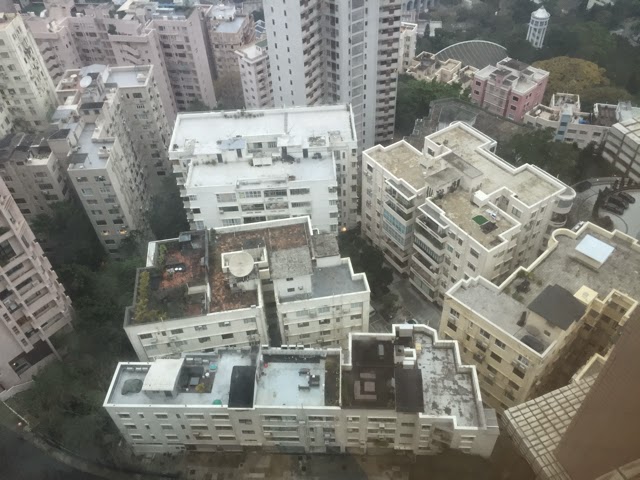
I decided to take a photo with my iphone of the roofs that we look down on because I thought sketching buildings would be interesting. I squared the photograph in Snapseed and tuned it up a bit and then took it into SketchClub. I created a layer above the photograph and proceeded to draw the outlines. Sometimes I was careful and sometimes a little scrappy but fairly accurate and just detailing the bits that stood out to me.
Original
Sketched Outline
I then took the original picture into Repix, I used the harsh Posterise and then Freshen to get this:
I took the sketched version into Photoshop Touch and removed the white using the magic wand. I then took both of these pictures back into SketchClub, overlaided the pen work and saved the result.
I could have left it at this stage but it didn't feel finished to me so I took it into iColorama and tuned it a bit using the Adjustment options. I then tried various transformations and the ones you see at the start are in order: Coherence>2, Painterly>Shock and Simplify>7 with opacity reduced by about a third.



.jpg)
